

How To Build a Telegram Bot with Python
Intermediate
Telegram is one of the most developer-friendly messaging platforms. Building a bot lets you automate tasks, answer questions, send alerts, and engage users directly. With the python-telegram-bot library, you get a battle-tested, async-first toolkit that abstracts away Telegram’s API complexity.
If you’ve never built a bot before, don’t worry — we’ll start with the fundamentals: setting up your bot token, handling /start and /help commands, processing user messages. By the end of this guide, you’ll understand inline keyboards, conversation flows, and deployment strategies. Whether you’re building a reminder bot, a trivia game, or an order processor, the patterns here apply universally.
We’ll walk through command handlers, inline keyboards, multi-step conversations with ConversationHandler, and how to choose between polling and webhooks. Let’s build something useful.

Quick Example
Here’s your first bot in under 30 lines:
# hello_bot.py
import asyncio
from telegram import Update
from telegram.ext import Application, CommandHandler, ContextTypes

async def start(update: Update, context: ContextTypes.DEFAULT_TYPE) -> None:
    """Send a message when the command /start is issued."""
    await update.message.reply_text(
        f"Hi {update.effective_user.first_name}! I'm a simple bot."
    )

async def help_command(update: Update, context: ContextTypes.DEFAULT_TYPE) -> None:
    """Send a message when the command /help is issued."""
    help_text = """
    Available commands:
    /start - Welcome message
    /help - This message
    """
    await update.message.reply_text(help_text)

if __name__ == "__main__":
    # Create Application (your bot)
    app = Application.builder().token("YOUR_BOT_TOKEN_HERE").build()

    # Register command handlers
    app.add_handler(CommandHandler("start", start))
    app.add_handler(CommandHandler("help", help_command))

    # Start polling for updates
    app.run_polling()
Run it with your bot token (from BotFather), and your bot responds to /start and /help. That’s it.
What Is python-telegram-bot?
python-telegram-bot is a pure-Python wrapper around the Telegram Bot API. It handles authentication, serialization, and networking so you focus on bot logic. Version 20+ (current) uses async/await natively, making it fast and scalable.
Installation and Setup
Install the library:
# terminal
pip install python-telegram-bot
Then create a bot with BotFather:
- Message
@BotFatheron Telegram - Send
/newbotand follow prompts - BotFather gives you a token:
123456:ABC-DEF1234ghIkl-zyx57W2v1u123ew11 - Save this token somewhere secure (never commit to git!)
Store your token in an environment variable:
# .env
BOT_TOKEN=123456:ABC-DEF1234ghIkl-zyx57W2v1u123ew11

# python
import os
from dotenv import load_dotenv

load_dotenv()
BOT_TOKEN = os.getenv("BOT_TOKEN")
Application vs Dispatcher
In older versions (v13), you’d use Dispatcher. Now (v20+), Application handles everything:
| Component | Purpose |
|---|---|
Application |
Main bot instance, holds handlers, manages polling/webhook |
Handler |
Matches conditions (command, message type, callback) and routes to a callback |
ContextTypes |
Type hints for update and context objects |
ConversationHandler |
Manages multi-step flows (e.g., form filling) |
Command Handlers: Basic Bot Logic
Commands are messages starting with /. CommandHandler matches them and calls your callback.
Multiple Commands
# math_bot.py
import asyncio
from telegram import Update
from telegram.ext import Application, CommandHandler, ContextTypes

async def square(update: Update, context: ContextTypes.DEFAULT_TYPE) -> None:
    """Calculate square of a number: /square 5"""
    try:
        num = int(context.args[0])
        result = num ** 2
        await update.message.reply_text(f"{num}^2 = {result}")
    except (IndexError, ValueError):
        await update.message.reply_text("Usage: /square ")

async def add(update: Update, context: ContextTypes.DEFAULT_TYPE) -> None:
    """Add two numbers: /add 3 4"""
    try:
        nums = [int(x) for x in context.args]
        if len(nums) < 2:
            raise ValueError
        result = sum(nums)
        await update.message.reply_text(f"Sum = {result}")
    except (ValueError, IndexError):
        await update.message.reply_text("Usage: /add   [num3...]")

if __name__ == "__main__":
    app = Application.builder().token("YOUR_BOT_TOKEN").build()

    app.add_handler(CommandHandler("square", square))
    app.add_handler(CommandHandler("add", add))

    app.run_polling()
Output (in Telegram):
User: /square 7
Bot: 7^2 = 49

User: /add 10 20 30
Bot: Sum = 60
context.args is a list of arguments after the command. Handle missing args gracefully.

Error Handling in Command Handlers
# safe_bot.py
import asyncio
from telegram import Update
from telegram.ext import Application, CommandHandler, ContextTypes

async def fetch_weather(update: Update, context: ContextTypes.DEFAULT_TYPE) -> None:
    """Fetch weather for a city."""
    try:
        if not context.args:
            await update.message.reply_text("Usage: /weather ")
            return

        city = " ".join(context.args)

        # Simulate API call
        if city.lower() == "london":
            temp = 15
            condition = "Rainy"
        elif city.lower() == "sunny town":
            temp = 25
            condition = "Sunny"
        else:
            await update.message.reply_text(f"City '{city}' not found.")
            return

        msg = f"Weather in {city}: {temp}°C, {condition}"
        await update.message.reply_text(msg)

    except Exception as e:
        await update.message.reply_text(f"Error: {str(e)}")

if __name__ == "__main__":
    app = Application.builder().token("YOUR_BOT_TOKEN").build()
    app.add_handler(CommandHandler("weather", fetch_weather))
    app.run_polling()
Always wrap async calls in try-catch. If your bot crashes without error handling, users get no feedback.
Message Handlers and Filters
Not all messages are commands. MessageHandler with filters lets you respond to text, photos, documents, and more.
Filter-Based Message Handling
# echo_and_count_bot.py
import asyncio
from telegram import Update
from telegram.ext import Application, MessageHandler, filters, ContextTypes

async def echo(update: Update, context: ContextTypes.DEFAULT_TYPE) -> None:
    """Echo back any text message."""
    text = update.message.text
    await update.message.reply_text(f"Echo: {text}")

async def handle_photo(update: Update, context: ContextTypes.DEFAULT_TYPE) -> None:
    """Handle photo uploads."""
    file_id = update.message.photo[-1].file_id  # Largest resolution
    await update.message.reply_text(
        f"Received photo (ID: {file_id}). Size: {update.message.photo[-1].file_size} bytes"
    )

async def handle_document(update: Update, context: ContextTypes.DEFAULT_TYPE) -> None:
    """Handle document uploads."""
    doc = update.message.document
    await update.message.reply_text(
        f"Received document: {doc.file_name} ({doc.file_size} bytes)"
    )

if __name__ == "__main__":
    app = Application.builder().token("YOUR_BOT_TOKEN").build()

    # Text messages only
    app.add_handler(MessageHandler(filters.TEXT & ~filters.COMMAND, echo))

    # Photo messages
    app.add_handler(MessageHandler(filters.PHOTO, handle_photo))

    # Documents
    app.add_handler(MessageHandler(filters.Document.ALL, handle_document))

    app.run_polling()
Output (in Telegram):
User: Hello world
Bot: Echo: Hello world

User: [uploads photo]
Bot: Received photo (ID: AgACAgIAAxkB...). Size: 45263 bytes

User: [uploads file.txt]
Bot: Received document: file.txt (1024 bytes)
Filters are chainable: filters.TEXT & ~filters.COMMAND means “text messages that aren’t commands”. See the docs for all available filters.
Inline Keyboards and Buttons
Inline keyboards are clickable buttons below messages. They send callback queries, not text.
Basic Inline Keyboard
# keyboard_bot.py
import asyncio
from telegram import Update, InlineKeyboardButton, InlineKeyboardMarkup
from telegram.ext import Application, CommandHandler, CallbackQueryHandler, ContextTypes

async def start(update: Update, context: ContextTypes.DEFAULT_TYPE) -> None:
    """Send a message with inline buttons."""
    keyboard = [
        [InlineKeyboardButton("Option A", callback_data="opt_a")],
        [InlineKeyboardButton("Option B", callback_data="opt_b")],
        [InlineKeyboardButton("Cancel", callback_data="cancel")],
    ]
    reply_markup = InlineKeyboardMarkup(keyboard)

    await update.message.reply_text(
        "Choose an option:",
        reply_markup=reply_markup
    )

async def button(update: Update, context: ContextTypes.DEFAULT_TYPE) -> None:
    """Handle button clicks."""
    query = update.callback_query
    await query.answer()  # Remove loading animation

    if query.data == "opt_a":
        await query.edit_message_text(text="You chose Option A!")
    elif query.data == "opt_b":
        await query.edit_message_text(text="You chose Option B!")
    elif query.data == "cancel":
        await query.edit_message_text(text="Cancelled.")

if __name__ == "__main__":
    app = Application.builder().token("YOUR_BOT_TOKEN").build()

    app.add_handler(CommandHandler("start", start))
    app.add_handler(CallbackQueryHandler(button))

    app.run_polling()
Output (in Telegram):
Bot: Choose an option:
     [Option A] [Option B] [Cancel]

User: [clicks Option A]
Bot: You chose Option A!
Confirmation Buttons Pattern
# confirmation_bot.py
import asyncio
from telegram import Update, InlineKeyboardButton, InlineKeyboardMarkup
from telegram.ext import Application, CommandHandler, CallbackQueryHandler, ContextTypes

async def delete_account(update: Update, context: ContextTypes.DEFAULT_TYPE) -> None:
    """Ask for confirmation before deleting."""
    keyboard = [
        [
            InlineKeyboardButton("Yes, delete", callback_data="confirm_delete"),
            InlineKeyboardButton("No, keep", callback_data="cancel_delete"),
        ]
    ]
    reply_markup = InlineKeyboardMarkup(keyboard)

    await update.message.reply_text(
        "Are you sure? This cannot be undone.",
        reply_markup=reply_markup
    )

async def handle_delete(update: Update, context: ContextTypes.DEFAULT_TYPE) -> None:
    """Handle delete confirmation."""
    query = update.callback_query
    await query.answer()

    if query.data == "confirm_delete":
        # Perform deletion
        await query.edit_message_text(text="Account deleted.")
    else:
        await query.edit_message_text(text="Account kept.")

if __name__ == "__main__":
    app = Application.builder().token("YOUR_BOT_TOKEN").build()

    app.add_handler(CommandHandler("delete", delete_account))
    app.add_handler(CallbackQueryHandler(handle_delete))

    app.run_polling()
ConversationHandler: Multi-Step Flows
For complex workflows (signup, order entry, settings), ConversationHandler manages state across multiple messages.
Registration Flow Example
# register_bot.py
import asyncio
from telegram import Update
from telegram.ext import (
    Application, CommandHandler, MessageHandler, ConversationHandler,
    ContextTypes, filters
)

# Conversation states
NAME, EMAIL, AGE = range(3)

async def start_registration(update: Update, context: ContextTypes.DEFAULT_TYPE) -> int:
    """Start registration flow."""
    await update.message.reply_text("Let's register! What's your name?")
    return NAME

async def get_name(update: Update, context: ContextTypes.DEFAULT_TYPE) -> int:
    """Store name and ask for email."""
    context.user_data["name"] = update.message.text
    await update.message.reply_text("Great! What's your email?")
    return EMAIL

async def get_email(update: Update, context: ContextTypes.DEFAULT_TYPE) -> int:
    """Store email and ask for age."""
    context.user_data["email"] = update.message.text
    await update.message.reply_text("And your age?")
    return AGE

async def get_age(update: Update, context: ContextTypes.DEFAULT_TYPE) -> int:
    """Store age and finish."""
    context.user_data["age"] = int(update.message.text)

    # Compile registration
    name = context.user_data["name"]
    email = context.user_data["email"]
    age = context.user_data["age"]

    summary = f"Registration complete!\nName: {name}\nEmail: {email}\nAge: {age}"
    await update.message.reply_text(summary)

    return ConversationHandler.END

async def cancel(update: Update, context: ContextTypes.DEFAULT_TYPE) -> int:
    """Cancel registration."""
    await update.message.reply_text("Registration cancelled.")
    return ConversationHandler.END

if __name__ == "__main__":
    app = Application.builder().token("YOUR_BOT_TOKEN").build()

    conv_handler = ConversationHandler(
        entry_points=[CommandHandler("register", start_registration)],
        states={
            NAME: [MessageHandler(filters.TEXT & ~filters.COMMAND, get_name)],
            EMAIL: [MessageHandler(filters.TEXT & ~filters.COMMAND, get_email)],
            AGE: [MessageHandler(filters.TEXT & ~filters.COMMAND, get_age)],
        },
        fallbacks=[CommandHandler("cancel", cancel)],
    )

    app.add_handler(conv_handler)
    app.run_polling()
Output (in Telegram):
User: /register
Bot: Let's register! What's your name?

User: Alice
Bot: Great! What's your email?

User: alice@example.com
Bot: And your age?

User: 28
Bot: Registration complete!
    Name: Alice
    Email: alice@example.com
    Age: 28
Notice context.user_data — it persists across messages in the same conversation. Each user has their own context.
Timeout and Error Recovery
# robust_registration_bot.py
import asyncio
from telegram import Update
from telegram.ext import (
    Application, CommandHandler, MessageHandler, ConversationHandler,
    ContextTypes, filters
)

NAME, EMAIL, AGE = range(3)

async def start_registration(update: Update, context: ContextTypes.DEFAULT_TYPE) -> int:
    """Start registration with timeout."""
    await update.message.reply_text(
        "Registration started. You have 5 minutes to complete it."
    )
    # Set a timeout callback
    context.application.create_task(
        handle_timeout(context.user_id, context)
    )
    await update.message.reply_text("What's your name?")
    return NAME

async def get_name(update: Update, context: ContextTypes.DEFAULT_TYPE) -> int:
    """Validate name (basic check)."""
    name = update.message.text.strip()
    if len(name) < 2:
        await update.message.reply_text("Name too short. Try again.")
        return NAME
    context.user_data["name"] = name
    await update.message.reply_text("Valid! Email?")
    return EMAIL

async def get_email(update: Update, context: ContextTypes.DEFAULT_TYPE) -> int:
    """Validate email."""
    email = update.message.text.strip()
    if "@" not in email:
        await update.message.reply_text("Invalid email. Try again.")
        return EMAIL
    context.user_data["email"] = email
    await update.message.reply_text("Age?")
    return AGE

async def get_age(update: Update, context: ContextTypes.DEFAULT_TYPE) -> int:
    """Validate age."""
    try:
        age = int(update.message.text)
        if age < 18:
            await update.message.reply_text("Must be 18+.")
            return AGE
    except ValueError:
        await update.message.reply_text("Enter a valid number.")
        return AGE

    context.user_data["age"] = age
    await update.message.reply_text("Registration complete!")
    return ConversationHandler.END

async def handle_timeout(user_id: int, context) -> None:
    """Handle registration timeout."""
    await asyncio.sleep(300)  # 5 minutes
    # In production, save incomplete registrations or notify user

async def cancel(update: Update, context: ContextTypes.DEFAULT_TYPE) -> int:
    """Cancel registration."""
    await update.message.reply_text("Cancelled. Type /register to restart.")
    return ConversationHandler.END

if __name__ == "__main__":
    app = Application.builder().token("YOUR_BOT_TOKEN").build()

    conv_handler = ConversationHandler(
        entry_points=[CommandHandler("register", start_registration)],
        states={
            NAME: [MessageHandler(filters.TEXT & ~filters.COMMAND, get_name)],
            EMAIL: [MessageHandler(filters.TEXT & ~filters.COMMAND, get_email)],
            AGE: [MessageHandler(filters.TEXT & ~filters.COMMAND, get_age)],
        },
        fallbacks=[CommandHandler("cancel", cancel)],
        conversation_timeout=300,  # 5 minutes
    )

    app.add_handler(conv_handler)
    app.run_polling()
Polling vs Webhooks
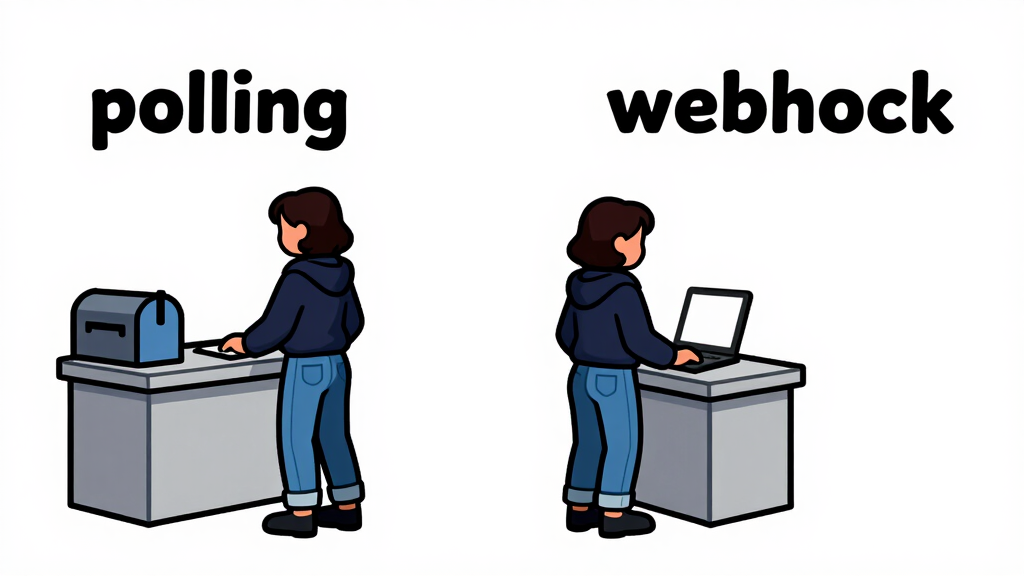
Your bot needs to receive updates from Telegram. Two strategies exist:
Polling: Simple, Continuous Checking
app.run_polling() repeatedly asks Telegram “any new messages?”. Simple, reliable, but slower (1-2 second latency).
# polling_bot.py
if __name__ == "__main__":
    app = Application.builder().token("YOUR_BOT_TOKEN").build()
    # ... add handlers ...
    app.run_polling()  # Blocks forever, polls every second
Best for: Testing, small bots, bots with infrequent messages.
Webhook: Instant Push Notifications
Telegram sends updates to your server via HTTP POST. Faster (instant), but requires HTTPS and a static IP.
# webhook_bot.py
from telegram.ext import Application
from telegram.error import TelegramError

async def main():
    app = Application.builder().token("YOUR_BOT_TOKEN").build()
    # ... add handlers ...

    # Set webhook (Telegram sends updates here)
    await app.bot.set_webhook(
        url="https://yourdomain.com/webhook/telegram",
        allowed_updates=["message", "callback_query"]
    )

    # Start the webhook server
    await app.run_webhook(
        listen="0.0.0.0",
        port=8443,
        url_path="/webhook/telegram",
        webhook_url="https://yourdomain.com/webhook/telegram",
    )

if __name__ == "__main__":
    import asyncio
    asyncio.run(main())
Best for: Production, high-volume bots, latency-sensitive use cases.
| Feature | Polling | Webhook |
|---|---|---|
| Latency | 1-2 seconds | Instant |
| Setup | Simple | HTTPS + DNS |
| Server Load | Higher (constant polling) | Lower (event-driven) |
| Best For | Testing, dev, low-volume | Production, high-volume |
Real-World Project: Weather Alert Bot
Let’s build a bot that lets users subscribe to weather alerts:
# weather_alert_bot.py
import asyncio
from telegram import Update, InlineKeyboardButton, InlineKeyboardMarkup
from telegram.ext import (
    Application, CommandHandler, CallbackQueryHandler, MessageHandler,
    ConversationHandler, ContextTypes, filters
)

# Simulated database (in production, use real database)
subscriptions = {}  # {user_id: {"city": "London", "alerts": True}}

CITY_NAME = range(1)

async def start(update: Update, context: ContextTypes.DEFAULT_TYPE) -> None:
    """Show main menu."""
    user_id = update.effective_user.id

    keyboard = [
        [InlineKeyboardButton("Subscribe to alerts", callback_data="subscribe")],
        [InlineKeyboardButton("View settings", callback_data="view_settings")],
        [InlineKeyboardButton("Unsubscribe", callback_data="unsubscribe")],
    ]
    reply_markup = InlineKeyboardMarkup(keyboard)

    await update.message.reply_text(
        "Weather Alert Bot\nChoose an option:",
        reply_markup=reply_markup
    )

async def menu_handler(update: Update, context: ContextTypes.DEFAULT_TYPE) -> int:
    """Handle menu button clicks."""
    query = update.callback_query
    await query.answer()
    user_id = query.from_user.id

    if query.data == "subscribe":
        await query.edit_message_text(
            "Enter a city name:"
        )
        return CITY_NAME

    elif query.data == "view_settings":
        if user_id in subscriptions:
            sub = subscriptions[user_id]
            text = f"City: {sub['city']}\nAlerts: {'Enabled' if sub['alerts'] else 'Disabled'}"
        else:
            text = "No subscription yet."
        await query.edit_message_text(text)

    elif query.data == "unsubscribe":
        if user_id in subscriptions:
            del subscriptions[user_id]
            await query.edit_message_text("Unsubscribed.")
        else:
            await query.edit_message_text("Not subscribed.")

    return ConversationHandler.END

async def get_city(update: Update, context: ContextTypes.DEFAULT_TYPE) -> int:
    """Store city and confirm subscription."""
    city = update.message.text
    user_id = update.effective_user.id

    subscriptions[user_id] = {
        "city": city,
        "alerts": True
    }

    keyboard = [
        [InlineKeyboardButton("Yes", callback_data="confirm_sub")],
        [InlineKeyboardButton("No", callback_data="cancel_sub")],
    ]
    reply_markup = InlineKeyboardMarkup(keyboard)

    await update.message.reply_text(
        f"Subscribe to alerts for {city}?",
        reply_markup=reply_markup
    )

    return ConversationHandler.END

async def confirm_subscription(update: Update, context: ContextTypes.DEFAULT_TYPE) -> None:
    """Handle subscription confirmation."""
    query = update.callback_query
    await query.answer()
    user_id = query.from_user.id

    if query.data == "confirm_sub":
        city = subscriptions[user_id]["city"]
        await query.edit_message_text(
            f"Subscribed to {city}. You'll receive alerts."
        )
    else:
        del subscriptions[user_id]
        await query.edit_message_text("Subscription cancelled.")

async def cancel(update: Update, context: ContextTypes.DEFAULT_TYPE) -> int:
    """Cancel any operation."""
    await update.message.reply_text("Cancelled.")
    return ConversationHandler.END

if __name__ == "__main__":
    app = Application.builder().token("YOUR_BOT_TOKEN").build()

    # Command handler
    app.add_handler(CommandHandler("start", start))

    # Conversation for subscription
    conv_handler = ConversationHandler(
        entry_points=[
            CallbackQueryHandler(menu_handler, pattern="^subscribe$")
        ],
        states={
            CITY_NAME: [
                MessageHandler(filters.TEXT & ~filters.COMMAND, get_city)
            ]
        },
        fallbacks=[CommandHandler("cancel", cancel)],
    )

    app.add_handler(conv_handler)
    app.add_handler(CallbackQueryHandler(menu_handler, pattern="^(view_settings|unsubscribe)$"))
    app.add_handler(CallbackQueryHandler(confirm_subscription, pattern="^(confirm_sub|cancel_sub)$"))

    app.run_polling()
Output (in Telegram):
User: /start
Bot: Weather Alert Bot
    [Subscribe to alerts] [View settings] [Unsubscribe]

User: [clicks Subscribe to alerts]
Bot: Enter a city name:

User: London
Bot: Subscribe to alerts for London?
    [Yes] [No]

User: [clicks Yes]
Bot: Subscribed to London. You'll receive alerts.

User: /start
Bot: Weather Alert Bot
    [Subscribe to alerts] [View settings] [Unsubscribe]

User: [clicks View settings]
Bot: City: London
    Alerts: Enabled
Frequently Asked Questions
How Do I Send Files or Media?
Use send_document(), send_photo(), send_audio(), etc. Pass a file path or URL:
await context.bot.send_photo(
    chat_id=update.effective_chat.id,
    photo="https://example.com/image.png",
    caption="Here's a photo"
)
Or upload from disk:
with open("photo.jpg", "rb") as f:
    await context.bot.send_photo(
        chat_id=update.effective_chat.id,
        photo=f
    )
What’s context.user_data vs context.chat_data?
context.user_data is per-user (persists across different chats). context.chat_data is per-chat/group (shared among all members). Use user_data for personal settings, chat_data for group state.
How Do I Handle Group Chats?
Add the bot to a group and mention it in commands: @bot_name /command. Check update.effective_chat.type to distinguish private vs group chats:
if update.effective_chat.type == "private":
    # One-on-one chat
    pass
elif update.effective_chat.type == "group":
    # Group chat
    pass
How Do I Store Persistent Data?
context.user_data and context.chat_data are in-memory only. For persistence, use a database (SQLite, PostgreSQL, MongoDB). The library supports BasePersistence for custom backends. For simple cases, serialize to JSON:
import json

# Save
with open("users.json", "w") as f:
    json.dump(subscriptions, f)

# Load
with open("users.json") as f:
    subscriptions = json.load(f)
How Do I Rate Limit My Bot?
Telegram has rate limits (30 messages/second per chat). Use asyncio.sleep() to throttle:
for user_id in user_list:
    await context.bot.send_message(user_id, "Alert!")
    await asyncio.sleep(0.05)  # 50ms between messages
Should I Use v20 or v13?
Always use v20+ (current). It’s async-first, faster, and actively maintained. v13 is deprecated. Install with pip install --upgrade python-telegram-bot.
Deployment Tips
Environment Variables
Never hardcode tokens. Use environment variables:
# .env
BOT_TOKEN=123456:ABC...

# main.py
import os
from dotenv import load_dotenv

load_dotenv()
BOT_TOKEN = os.getenv("BOT_TOKEN")
Systemd Service (Linux)
# /etc/systemd/system/telegram-bot.service
[Unit]
Description=Telegram Bot
After=network.target

[Service]
Type=simple
User=bot_user
WorkingDirectory=/home/bot_user/telegram_bot
ExecStart=/usr/bin/python3 /home/bot_user/telegram_bot/main.py
Restart=always
RestartSec=10

[Install]
WantedBy=multi-user.target
Enable and start:
sudo systemctl enable telegram-bot
sudo systemctl start telegram-bot
Docker Deployment
# Dockerfile
FROM python:3.11-slim

WORKDIR /app
COPY requirements.txt .
RUN pip install -r requirements.txt

COPY . .

CMD ["python", "main.py"]
# docker-compose.yml
version: "3"
services:
  bot:
    build: .
    environment:
      BOT_TOKEN: ${BOT_TOKEN}
    restart: always
Conclusion
You’ve learned the core patterns: command handlers, message filters, inline keyboards, and multi-step conversations. The python-telegram-bot library handles the complexity of the Telegram API, letting you focus on bot logic.
Start with polling for development, graduate to webhooks for production. Use ConversationHandler for complex flows, and always persist critical data to a database. Your next Telegram bot awaits.
For detailed API docs, visit the official documentation. Check out the examples on GitHub for inspiration.