

Last Updated: June 01, 2026
Advanced
Making computer generated text mimic human speech is fascinating and actually not that difficult for an effect that is sometimes convincing, but certainly entertaining. Markov Chain’s is one way to do this. It works by generating new text based on historical texts where the original sequencing of neighboring words (or groups of words) is used to generate meaningful sentences. Read the below guide on how to code a Markov Chain text generator (code example in python) including explanation of the concept.
What’s really interesting, is that you can take historical texts of a person, then generate new sentences which can sound similar to the way that person speaks. Alternatively, you can combine texts from two different people and get a mixed “voice”.
I played around this with texts of speeches from two great presidents:

What my Markov Chain generated which was “trained” using the combination of texts from Obama speeches and Bartlet scripts, is as follows:
- ‘Can I burn my mother in North Carolina for giving us a great night planned.’
- ‘And so going forward, I believe that we can build a bomb into their church.’
- ‘’Charlie, my father had grown up in the Situation Room every time I came in.’’
- ‘This campaign must be ballistic.’,

Python developer and educator with 15+ years building production systems across data engineering, web APIs, and AI tooling. Founder of Python How To Program — 270+ in-depth tutorials covering the modern Python stack.
What is a Markov Chain in the context of a text generation?
For a more technical explanation, I think you can find plenty of resources out there. In simple terms, it is an algorithm which is used to generate a new outcome from a weighted list of words based on historical texts. Now that’s rather abstract. In more practical terms, in the scenario for text generation, it is a way to use historical texts, chop it up into individual words (or sets of words), and then randomly chose a given word then randomly chose the next likely words based on historical sequences. For example:
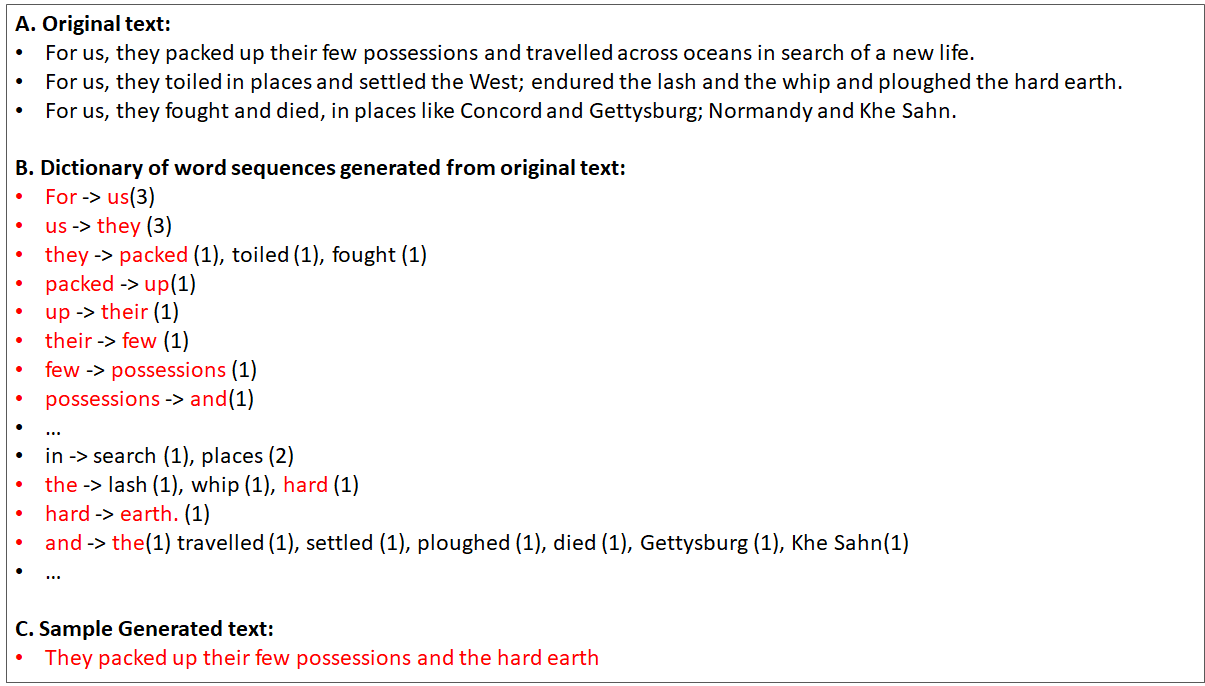
This doesn’t just apply in text as well (although one of the most popular applications is in your smart phone where there’s predictive text), it can be used for any scenario where you use historical information to define next steps for a given state. For example, you could codify a given stock market pattern (such as the % daily changes for the last 30 days), then use that to see historically what was the likely next day outcome (example only.. I’m very doubtful how effective it would be).
Why are Markov Chain Text Generators so fun?
I’ve always wanted to build a text generator as it’s just an awesome way to see how you could mimic intelligence using a very cheap shortcut. You’ll see the algorithm below, and it is super simple. The other fact is that, like above example, you can use it to mix the ‘voice’ from two different persons and see the outcome.
How does the Markov Chain Text Generator work?
There are two phases for text generation with Markov Chains. There’s first the ‘dictionary build phase’ which involves gathering the historical texts, and then generating a dictionary with the key being a given word in a sentence, and then having the resultant being the natural follow-up words.
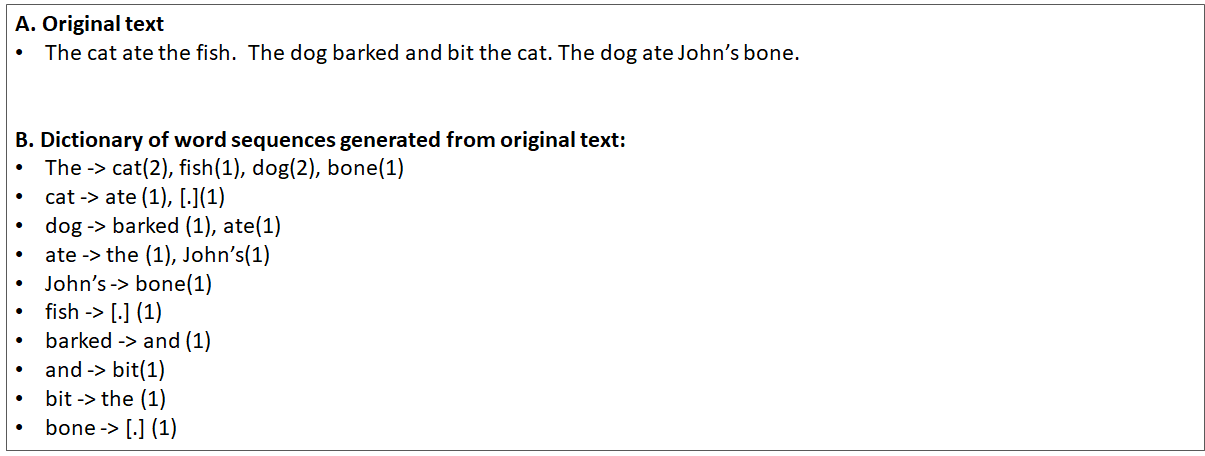
The second is the execution, where you start from a given word, then use that word to see what the next word would be in a probabilistic way. For example:
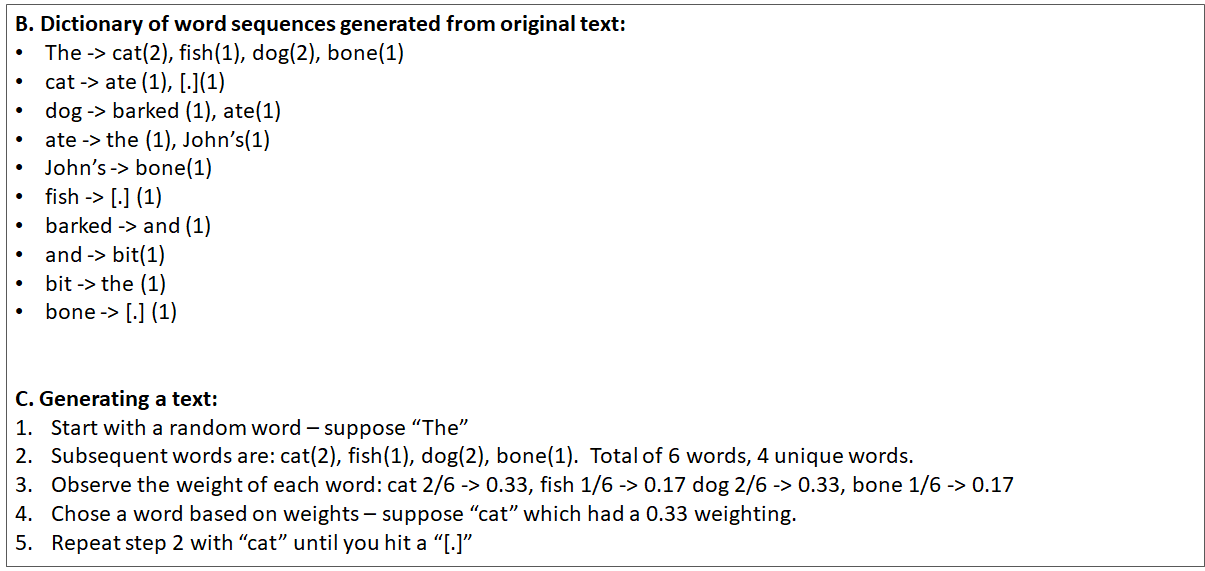
Now, there are some tricks which you need to be mindful of ( I found this out the hard way):
- You can’t start from any random word — if you do, then you’ll get sentences like this: “ate the cat.” . You have to keep track of “starting words” to keep things simple — hence you can have: “John ate the cat”.
- Don’t ignore punctuation— if you do remove punctuation, you’ll get sentence like this: “The dog barked at John cat”. Instead keep them there so that you can have a better chance to have a more realistic sentence — i.e. “The dog barked at John’s ca”
- End on a full-stop word. When you go through and start from a word, then find the next word, then find the next word and so on, you can continue until you reach a specified length, but then you’ll end up stopping in mid-sentence such as this: “The cat ate John’s”. Instead, simply end when you have a word that has a full stop (another reason not to remove the punctuation) — i.e. “The cat ate John’s boots.”
Markov Chain Example Code Source texts
I played around with different texts including: Eddie Murphy stand-up routines, Donald Trump tweets, Obama speeches, and Jed Bartlet dialogue. You can find the the markov chain example source text here. It’s great to use one source and then generate the dictionary, but then you can mix and match and use two sources (e.g. Obama and Bartlet) and then create the one dictionary file. Then when you traverse the dictionary you get the both voices.
It is important to make sure that you can balance the text — e.g. if you had a 8000 text from Obama and only 1000 text from Eddie Murphy, it’s likely that you would see more of the Obama words. Of course, when you build the dictionary, you can also add some artificial weighting towards the lighter text source to balance things out.
Markov Chain Summary
The Markov Chain text generator is not perfect — you’ll see when you create your own, that some text is just gibberish. The more text that you have the better. Secondly, using single words is not helpful in the dictionary — you should use groups of 2–3 words. The actual number depends on how much historical text you have.
You can find all the python code, source texts and Markov Chain python example code here. Good luck!
Subscribe to our newsletter

How To Get CPU Core Usage with psutil in Python
Intermediate
Your server is running slow, but top shows average CPU at 45% — nothing alarming. Then a colleague points out that core 3 has been pinned at 100% for the last hour while the other seven cores sit idle. A single-threaded bottleneck is strangling your app, invisible to anyone watching only the aggregate number. This is exactly the kind of problem you cannot catch without per-core monitoring, and Python makes it surprisingly easy to build.
The psutil library gives you cross-platform access to CPU usage per core, per-core clock frequency, per-core time breakdowns (user, system, idle), and memory statistics — all in a few lines of Python. It works identically on Windows, macOS, and Linux without requiring root access or system-specific tools like top, htop, or Task Manager. Install it once with pip and you are ready to go.
In this article we will cover everything you need to build a CPU monitoring tool with psutil. We start with a Quick Example so you get per-core numbers immediately. Then we dig into cpu_percent(), physical vs logical core counts, per-core frequency with cpu_freq(), time breakdowns with cpu_times(), memory monitoring, and threshold-based alerting. By the end you will have a real-time terminal dashboard you can point at any machine.
Getting Per-Core CPU Usage: Quick Example
Let us start with the most useful function in psutil for this task. The key is the percpu=True flag on cpu_percent() — without it you get one aggregate number; with it you get a list of percentages, one per logical core.
# quick_cpu_check.py
import psutil
import time

# Pass interval=1 to measure over a 1-second window (recommended)
# percpu=True returns a list -- one value per logical CPU core
core_usage = psutil.cpu_percent(interval=1, percpu=True)

print(f"Logical cores detected: {len(core_usage)}")
print()

for i, pct in enumerate(core_usage):
    bar = "#" * int(pct / 5)
    print(f"  Core {i:>2}: {pct:5.1f}%  [{bar:<20}]")

print()
print(f"  Overall: {psutil.cpu_percent(interval=None):.1f}%")
Output:
Logical cores detected: 8

  Core  0:  23.4%  [####                ]
  Core  1:   8.1%  [#                   ]
  Core  2:  91.3%  [##################  ]
  Core  3:   6.2%  [#                   ]
  Core  4:  12.7%  [##                  ]
  Core  5:   9.4%  [#                   ]
  Core  6:  17.6%  [###                 ]
  Core  7:   5.0%  [#                   ]

  Overall: 21.7%
The output instantly reveals that core 2 is at 91% while the overall average looks benign at 21.7%. That discrepancy is exactly what aggregate monitoring misses. The interval=1 parameter tells psutil to collect a sample, wait one second, collect another, and return the difference -- this gives you a meaningful measurement rather than a snapshot that could be zero. The len(core_usage) check tells you how many logical cores the machine has, which varies from 2 on a budget laptop to 128 on a high-end server.
The rest of this article explains how each piece works, adds frequency and memory data, and builds toward a live refreshing terminal dashboard. Read on for the details, or jump straight to the Real-Life Example if you want the full script now.
What is psutil and Why Use It?
psutil (process and system utilities) is a cross-platform library for retrieving information on running processes and system utilization -- CPU, memory, disks, network, and sensors. It wraps the underlying OS interfaces (/proc on Linux, sysctl on macOS, Win32 API on Windows) so your Python code runs unchanged on all three platforms.
The alternative to psutil is platform-specific shell commands: mpstat -P ALL 1 on Linux, sysctl hw.perflevel0.physicalcpu on macOS, or WMI queries on Windows. You could parse their output with subprocess, but you would need separate code paths for each OS and your script would break every time the command output format changes. psutil solves all of that.
| Method | Platform | Root Required | Per-Core Data | Python API |
|---|---|---|---|---|
| psutil | Windows / macOS / Linux | No | Yes | Yes -- clean objects |
| mpstat | Linux only | No | Yes | Parse subprocess output |
| top / htop | Unix-like | No | Yes | No -- interactive only |
| WMI | Windows only | Admin for some | Partial | Via pywin32 |
| /proc/stat | Linux only | No | Yes | Manual file parsing |
Install psutil with pip -- it has no dependencies and compiles quickly:
# install_psutil.sh
pip install psutil
Once installed you can import it and immediately start querying system metrics. The sections below walk through each function you need for CPU monitoring.

Logical vs Physical Cores: What cpu_count() Returns
Before diving deeper into usage numbers, it helps to understand what "core" actually means here. Modern CPUs expose more logical cores than they have physical cores because of hyperthreading (Intel) or SMT (AMD). A 4-core chip with hyperthreading shows up as 8 logical cores. psutil lets you query both counts.
# core_count.py
import psutil

logical = psutil.cpu_count(logical=True)   # includes hyperthreads
physical = psutil.cpu_count(logical=False)  # physical cores only

print(f"Physical cores:  {physical}")
print(f"Logical cores:   {logical}")
print(f"Hyperthreading:  {'Yes' if logical > physical else 'No'}")
print(f"HT ratio:        {logical // physical}x" if physical else "")
Output:
Physical cores:  4
Logical cores:   8
Hyperthreading:  Yes
HT ratio:        2x
The number of items in the list returned by cpu_percent(percpu=True) always matches cpu_count(logical=True) -- you get one entry per logical core. Physical core count matters for workloads that benefit from true parallelism (CPU-bound Python processes, for example) vs workloads that are mostly I/O-bound and can share a core fine. Knowing the physical count also helps you interpret the per-core usage: if logical cores 0 and 1 are both busy, that is likely one physical core under full load.
Per-Core Frequency with cpu_freq()
CPU frequency tells you whether a core is running at full speed or has been throttled by thermal limits. Modern processors use dynamic frequency scaling: they boost above the rated speed when the workload demands it (and the chip is cool enough), and throttle down to save power or prevent overheating.
# cpu_frequency.py
import psutil

# percpu=True returns a list of scpufreq namedtuples
freqs = psutil.cpu_freq(percpu=True)

if freqs:
    print(f"{'Core':<8} {'Current MHz':>12} {'Min MHz':>10} {'Max MHz':>10}")
    print("-" * 44)
    for i, f in enumerate(freqs):
        print(f"Core {i:<3}  {f.current:>10.0f}   {f.min:>9.0f}  {f.max:>9.0f}")
else:
    # Some Linux VMs do not expose per-core frequency
    overall = psutil.cpu_freq()
    print(f"Per-core freq not available. Overall: {overall.current:.0f} MHz")
Output:
Core     Current MHz    Min MHz    Max MHz
--------------------------------------------
Core 0      3600        800       4200
Core 1      4100        800       4200
Core 2      4200        800       4200
Core 3      3200        800       4200
Core 4      3800        800       4200
Core 5      4000        800       4200
Core 6      4200        800       4200
Core 7      2900        800       4200
A core sitting at its maximum frequency (4200 MHz here) that also shows high CPU usage is healthy -- it is working hard and boosting as designed. A core showing high CPU usage but stuck at minimum frequency (800 MHz) is likely being throttled due to heat, and you have a cooling problem rather than a workload problem. The defensive check for if freqs: is important: some virtualized Linux environments do not expose per-core frequency and return an empty list.

Per-Core Time Breakdown with cpu_times()
CPU usage percentage tells you HOW MUCH a core is working, but not what it is doing. cpu_times() breaks the time a CPU has spent into categories: user space (your code), kernel space (system calls), idle, and on Linux you also get I/O wait and steal time (from hypervisor overhead in VMs).
# cpu_times_breakdown.py
import psutil

times = psutil.cpu_times(percpu=True)

print(f"{'Core':<6} {'User%':>7} {'Sys%':>7} {'Idle%':>7} {'IOWait%':>9}")
print("-" * 40)

for i, t in enumerate(times):
    total = t.user + t.system + t.idle + getattr(t, 'iowait', 0.0)
    if total == 0:
        continue
    user_pct   = t.user   / total * 100
    sys_pct    = t.system / total * 100
    idle_pct   = t.idle   / total * 100
    iowait_pct = getattr(t, 'iowait', 0.0) / total * 100
    print(f"Core {i:<1}  {user_pct:>7.1f} {sys_pct:>7.1f} {idle_pct:>7.1f} {iowait_pct:>9.1f}")
Output:
Core   User%    Sys%   Idle%   IOWait%
----------------------------------------
Core 0   18.2     4.1    77.7       0.0
Core 1    6.5     1.6    91.9       0.0
Core 2   88.4     2.9     8.7       0.0
Core 3    5.1     1.1    93.8       0.0
Core 4   11.3     0.8    87.9       0.1
Core 5    8.7     0.9    90.4       0.0
Core 6   15.2     1.4    83.4       0.0
Core 7    4.2     0.6    95.2       0.0
Note the getattr(t, 'iowait', 0.0) pattern. The iowait field only exists on Linux; using getattr with a default keeps the code portable to macOS and Windows. A core with high user% is running application code. High sys% means lots of system calls (file I/O, socket operations). High iowait% means the core is waiting on storage -- often a sign that your database or file access is the real bottleneck, not CPU.
Memory Monitoring: virtual_memory()
CPU monitoring is rarely useful in isolation -- memory pressure often causes CPU spikes as the OS spends cycles on swapping. Adding memory data to your monitor gives a more complete picture.
# memory_check.py
import psutil

mem = psutil.virtual_memory()
swap = psutil.swap_memory()

def fmt_bytes(n):
    for unit in ('B', 'KB', 'MB', 'GB', 'TB'):
        if n < 1024:
            return f"{n:.1f} {unit}"
        n /= 1024
    return f"{n:.1f} PB"

print("RAM:")
print(f"  Total:     {fmt_bytes(mem.total)}")
print(f"  Available: {fmt_bytes(mem.available)}")
print(f"  Used:      {fmt_bytes(mem.used)}  ({mem.percent:.1f}%)")
print(f"  Buffers:   {fmt_bytes(getattr(mem, 'buffers', 0))}")
print(f"  Cached:    {fmt_bytes(getattr(mem, 'cached', 0))}")
print()
print("Swap:")
print(f"  Total:     {fmt_bytes(swap.total)}")
print(f"  Used:      {fmt_bytes(swap.used)}  ({swap.percent:.1f}%)")
Output:
RAM:
  Total:     15.9 GB
  Available: 9.3 GB
  Used:      6.1 GB  (38.7%)
  Buffers:   312.0 MB
  Cached:    4.2 GB

Swap:
  Total:     2.0 GB
  Used:      0.0 MB  (0.0%)
The mem.available field is the most actionable metric here -- it is not the same as mem.total - mem.used. Available includes memory that is currently used for caches but can be reclaimed immediately by applications. If mem.available drops near zero while swap.percent climbs, your machine is under genuine memory pressure and performance will degrade. The getattr calls on buffers and cached guard against Windows, which does not expose those fields.

Threshold Alerting: Raising Warnings When Cores Spike
Collecting metrics is only useful if something reacts to them. The next step is adding threshold checks so your monitoring code can trigger an alert, write to a log file, or send a notification when a core crosses a usage limit you define.
# cpu_alerts.py
import psutil
import time
import logging

logging.basicConfig(
    level=logging.INFO,
    format="%(asctime)s [%(levelname)s] %(message)s",
    datefmt="%H:%M:%S",
)

CPU_WARN_PCT  = 70.0   # warn if any single core exceeds this
CPU_CRIT_PCT  = 90.0   # critical if any core exceeds this
MEM_WARN_PCT  = 80.0   # warn if RAM usage exceeds this
CHECK_INTERVAL = 5     # seconds between checks

def check_once():
    per_core = psutil.cpu_percent(interval=1, percpu=True)
    mem = psutil.virtual_memory()

    for i, pct in enumerate(per_core):
        if pct >= CPU_CRIT_PCT:
            logging.critical("Core %d at %.1f%% -- CRITICAL", i, pct)
        elif pct >= CPU_WARN_PCT:
            logging.warning("Core %d at %.1f%% -- high usage", i, pct)

    if mem.percent >= MEM_WARN_PCT:
        logging.warning("RAM at %.1f%% -- available: %.1f GB",
                        mem.percent, mem.available / 1e9)

if __name__ == "__main__":
    logging.info("Starting CPU/memory monitor (Ctrl+C to stop)")
    try:
        while True:
            check_once()
            time.sleep(CHECK_INTERVAL)
    except KeyboardInterrupt:
        logging.info("Monitor stopped.")
Output:
09:14:01 [INFO] Starting CPU/memory monitor (Ctrl+C to stop)
09:14:02 [WARNING] Core 2 at 73.5% -- high usage
09:14:07 [CRITICAL] Core 2 at 94.1% -- CRITICAL
09:14:12 [CRITICAL] Core 2 at 98.7% -- CRITICAL
09:14:17 [INFO] Monitor stopped.
Using the standard logging module rather than print() means you can redirect this output to a file with one line change (filename="monitor.log" in the basicConfig call), or hook it into any structured logging pipeline. The CHECK_INTERVAL constant separated from cpu_percent(interval=1) is intentional -- the interval on cpu_percent controls measurement accuracy, while CHECK_INTERVAL controls how often you act on the results.
Real-Life Example: Live Terminal CPU Dashboard
Let us combine everything into a dashboard that refreshes in place every two seconds, showing per-core bars, frequency, and memory -- all in one compact terminal view.

# cpu_dashboard.py
import psutil
import time
import os

CPU_WARN  = 70.0
CPU_CRIT  = 90.0
REFRESH   = 2.0   # seconds between refreshes

def color(pct):
    """Return ANSI color code based on usage percentage."""
    if pct >= CPU_CRIT:
        return "\033[91m"   # bright red
    if pct >= CPU_WARN:
        return "\033[93m"   # yellow
    return "\033[92m"       # green

RESET = "\033[0m"

def make_bar(pct, width=24):
    filled = int(pct / 100 * width)
    return "#" * filled + "-" * (width - filled)

def render():
    os.system("cls" if os.name == "nt" else "clear")
    print("=" * 56)
    print("  psutil CPU Dashboard -- press Ctrl+C to exit")
    print("=" * 56)

    per_core = psutil.cpu_percent(interval=1, percpu=True)
    freqs    = psutil.cpu_freq(percpu=True) or []
    mem      = psutil.virtual_memory()
    logical  = psutil.cpu_count(logical=True)
    physical = psutil.cpu_count(logical=False)

    print(f"  Cores: {physical} physical / {logical} logical\n")

    for i, pct in enumerate(per_core):
        freq_str = ""
        if i < len(freqs):
            freq_str = f"  {freqs[i].current:>5.0f} MHz"
        bar = make_bar(pct)
        c = color(pct)
        print(f"  Core {i:>2}: {c}[{bar}]{RESET} {pct:5.1f}%{freq_str}")

    avg = sum(per_core) / len(per_core) if per_core else 0
    print(f"\n  Avg:    [{make_bar(avg)}] {avg:5.1f}%")
    print()

    mem_bar = make_bar(mem.percent, width=24)
    mc = color(mem.percent)
    avail_gb = mem.available / 1e9
    print(f"  RAM:    {mc}[{mem_bar}]{RESET} {mem.percent:5.1f}%  "
          f"({avail_gb:.1f} GB free)")

    swap = psutil.swap_memory()
    if swap.total > 0:
        swap_bar = make_bar(swap.percent, width=24)
        sc = color(swap.percent)
        print(f"  Swap:   {sc}[{swap_bar}]{RESET} {swap.percent:5.1f}%")

    print()
    print(f"  Updated every {REFRESH}s -- {time.strftime('%H:%M:%S')}")
    print("=" * 56)

if __name__ == "__main__":
    try:
        while True:
            render()
            time.sleep(REFRESH)
    except KeyboardInterrupt:
        print("\nDashboard stopped.")
Output (sample frame):
========================================================
  psutil CPU Dashboard -- press Ctrl+C to exit
========================================================
  Cores: 4 physical / 8 logical

  Core  0: [######------------------]  25.4%   3600 MHz
  Core  1: [#-----------------------]   8.1%   2900 MHz
  Core  2: [######################--]  91.3%   4200 MHz
  Core  3: [#-----------------------]   6.2%   3100 MHz
  Core  4: [###---------------------]  12.7%   3400 MHz
  Core  5: [##----------------------]   9.4%   3200 MHz
  Core  6: [###---------------------]  17.6%   3800 MHz
  Core  7: [#-----------------------]   5.0%   2800 MHz

  Avg:    [####--------------------]  22.0%

  RAM:    [############------------]  51.2%  (7.8 GB free)
  Swap:   [------------------------]   0.0%

  Updated every 2s -- 09:17:44
========================================================
The os.system("cls" if os.name == "nt" else "clear") call clears the terminal before each refresh, giving the appearance of an in-place update rather than scrolling output. The ANSI color codes turn critical cores red and high-usage cores yellow in any terminal that supports them (macOS Terminal, Linux terminals, Windows Terminal). To log to a file instead of the terminal, replace the render() call with the check_once() pattern from the alerting section. You can also extend this script by adding disk I/O stats with psutil.disk_io_counters(perdisk=True) or network throughput with psutil.net_io_counters(pernic=True).
Frequently Asked Questions
Why does cpu_percent() return 0.0 when I call it with no arguments?
The first call to psutil.cpu_percent() with no interval and no previous call in the same process always returns 0.0. psutil calculates CPU usage as the difference between two samples taken some time apart. The first call just sets the baseline; the second call (or a call with interval=N) returns the actual measurement. Always use interval=1 (or at least 0.1) for accurate readings, or call the function once at startup to prime it and then call it again after a small sleep.
When should I use logical=True vs logical=False in cpu_count()?
Use cpu_count(logical=True) when you want to know how many workers to create for I/O-bound tasks -- more logical cores means more threads can be useful. Use cpu_count(logical=False) for CPU-bound work where you spawn Python processes -- extra logical cores from hyperthreading rarely help CPU-bound code and can actually hurt throughput by competing for the same physical core resources. When in doubt, benchmark both: run your workload with physical workers and with logical workers and compare wall-clock time.
Does psutil need root/admin privileges?
No -- reading CPU usage percentages, frequencies, core counts, and memory stats does not require elevated permissions on Windows, macOS, or Linux. Some psutil functions DO require root, such as reading per-process memory maps or certain sensor temperatures (psutil.sensors_temperatures()). For a pure CPU and memory monitoring script like the one in this article, you can run as a regular user. If you get a psutil.AccessDenied exception, check which specific function triggered it -- it is almost certainly a process-level function, not a system-level one.
cpu_freq(percpu=True) returns an empty list on my Linux VM. What is wrong?
This is expected behavior on many virtualized Linux environments. The guest OS does not always have access to the host CPU's frequency scaling information. The psutil.cpu_freq() function reads from /sys/devices/system/cpu/cpu*/cpufreq/ on Linux, which may not be populated by the hypervisor. Some cloud VMs (AWS, GCP, Azure) intentionally withhold this data. The safe approach is to always check if freqs: before iterating, and fall back to a single aggregate call (psutil.cpu_freq(percpu=False)) or simply skip the frequency column. The CPU usage percentage from cpu_percent() remains accurate even when frequency data is unavailable.
Does this code work on Windows without any changes?
Yes, with one small caveat: the ANSI color codes in the dashboard script require Windows 10 version 1607 or later with Windows Terminal or a VT100-compatible terminal. The standard Windows Command Prompt (cmd.exe) on older Windows versions does not render ANSI codes and will display them as literal characters like [91m. You can guard against this by wrapping the ANSI output in a try/except or by using the colorama library (pip install colorama), which translates ANSI codes to Win32 console calls. Everything else -- cpu_percent(), cpu_count(), cpu_freq(), virtual_memory(), and swap_memory() -- works identically on Windows.
Can I get CPU temperature with psutil?
On Linux and some macOS hardware, yes: psutil.sensors_temperatures() returns a dictionary of sensor readings grouped by device name. The key for CPU cores is usually 'coretemp' or 'k10temp' depending on the chip. Each entry has current, high, and critical temperature values in Celsius. This function is not available on Windows -- psutil simply does not expose it there because the Windows thermal sensor APIs require platform-specific third-party libraries. On unsupported platforms the call raises AttributeError, so always check hasattr(psutil, 'sensors_temperatures') before using it.
Conclusion
psutil makes per-core CPU monitoring a matter of two function calls. cpu_percent(interval=1, percpu=True) gives you a list of usage values -- one per logical core -- that reveals the imbalances a single aggregate number would hide. cpu_count(logical=True/False) tells you whether extra cores come from hyperthreading or are genuine physical cores. cpu_freq(percpu=True) shows whether cores are boosting or being throttled. cpu_times(percpu=True) breaks usage down into user, system, and iowait time so you know whether CPU cycles are spent on application code, kernel calls, or waiting on storage. And virtual_memory() and swap_memory() round out the picture by capturing memory pressure alongside CPU load.
Extend the dashboard by adding psutil.disk_io_counters(perdisk=True) for storage throughput, psutil.net_io_counters(pernic=True) for network stats, or hook the alert thresholds into a notification service like Slack or PagerDuty. You could also export metrics to a time-series database like Prometheus by wrapping the psutil calls in a Flask endpoint and adding a Prometheus client. The psutil documentation at psutil.readthedocs.io covers every available function in depth.
For deeper exploration, the Python Scalene profiler article shows how to go beyond monitoring into detailed line-level CPU and memory profiling within your own code, and the Python task automation guide covers scheduling monitoring scripts to run on a cron job.
Related Articles
Further Reading: For more details, see the Python random module documentation.
Frequently Asked Questions
What is a Markov chain in simple terms?
A Markov chain is a mathematical model where the next state depends only on the current state, not on the sequence of events that preceded it. In text generation, this means the next word is predicted based only on the current word or phrase.
How does a Markov chain text generator work in Python?
A Python Markov chain text generator builds a dictionary of word transitions from training text. Each word maps to a list of words that follow it. The generator then randomly selects next words based on these observed probabilities to create new text.
What are the limitations of Markov chain text generation?
Markov chains produce text that can be grammatically inconsistent over long passages because they only consider local context (the previous few words). They lack understanding of meaning, coherence, and long-range dependencies that modern language models handle better.
Can I use Markov chains for purposes other than text generation?
Yes. Markov chains are used in weather prediction, stock market modeling, DNA sequence analysis, game AI, PageRank algorithms, and many simulation scenarios. Any system where transitions between states follow probabilistic rules can be modeled with Markov chains.
How do I improve the quality of Markov chain generated text?
Increase the chain order (use pairs or triples of words instead of single words as keys), use larger and higher-quality training data, add post-processing to fix grammar, and filter out nonsensical outputs. Higher-order chains produce more coherent text but require more training data.
Related Articles
- How To Build a Dashboard with Python and Dash
- How To Use Python Streamlit for Interactive Data Apps
- How To Analyze Networks and Graphs with NetworkX in Python
- How To Use SymPy for Symbolic Mathematics in Python
- How To Use NumPy Arrays for Scientific Computing in Python
- How To Create Plots and Charts with Matplotlib in Python
- Printing Text, Newlines, Format, Exceptions With Examples
Continue Learning Python
Tutorials you might also find useful: